

Introduction
Microsoft Fabric became the hottest topic in Power platform after the Ignite conference on November 15, 2023. As the modern world requires modern solutions Fabric adds a new value to Power BI in the form of a cloud-based SaaS foundation by bringing Data Engineering, Data Factory, Data Science, Data Warehouse, Real-Time Analytics, and Power BI into a single workspace. Microsoft made it easier for Data team members to work together in a single workspace without accessing different services/IDEs (Integrated Development Environment) from multiple vendors.
Core components in Fabric
Fabric OneLake provides the architecture needed for the collaboration of core components by the key feature called OneCopy, which allows you to move and copy data between different systems. There will be only one copy of data to read which supports to eliminate the duplication of data. OneLake is built on top of Azure Data Lake Storage (ADLS) and data can be stored in any format, including Delta, Parquet, CSV, JSON, and much more.
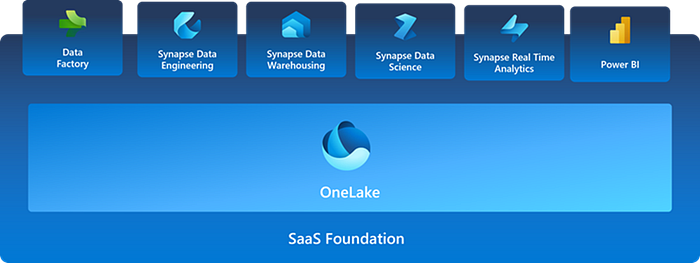
Fabric offers following six core components (for more details, use the Microsoft documentation links provided):
- Data Factory — Azure Data Factory (ADF) comes with an amazing feature Fast Copy where you can move data to Lakehouse and Data Warehouse in Fabric.
- Data Engineering — enabling to perform data transformation on large scale data with Data Factory allows you to schedule spark jobs to run. Users will be able to maintain a proper infrastructure on their own to collect, store, process, and analyze large volumes of data.
- Data Warehousing — Fabric allows to automatically generate SQL analytics endpoint from Lakehouse space. Users can easily switch from view in Lakehouse to SQL view. This will happen in the same view/space which made it much more easier to the users.
- Data Science — Fabric allows you to perform the tasks such as data preparation, data preprocessing and modelling in workspace itself. You can use Spark, PySpark etc. for data preprocessing tasks at scale.
- Real — Time Analytics — Most emerging data category at the moment is real time data where you can connect various data formats into single dataset and provide analytics in real time. Due to fast growing technology at present, real time analytics become an essential in many enterprise applications such as to avoid frauds, to quality control and for health and safety etc. Now fabric helps you to fully integrate such scenarios and give analysis as per the requirements.
- Power BI — The focus in this blog will be this core component which is a leading business intelligence tool use widely by many organizations to get meaning insights out of the data available and make valuable decisions for the organization.
Power BI and Microsoft Fabric
All the existing features in Power BI workspace can be enjoyed by the users as it is and new features have been added to help in completion of end-to-end analytical process. From data pre-processing to data modelling and then to data visualization which will be the end product used by the interested parties of the organization for decision making can be implemented easily done with Fabric workspace.
Copilot in Power BI is phenomenal!
Introducing AI feature which is Copilot to build Power BI reports is a game changer for the users. Even the users who doesn’t have any technical skill are able to create simple dashboards easily with this AI feature. Within few seconds users are now able to create and tailor reports and then if needed they can edit DAX calculations as required. If you are familiar with Q&A feature in Power BI, Copilot is also similar to that, but it has more advanced features where you can even create new visuals easily by giving the requirement using Natural Language. Copilot helps not only to create Power BI reports but also to generate codes from different languages.
Another interesting feature that Power BI developers/users need to focus is Direct Lake mode which enables you to perform directly against OneLake without moving data. Power BI datasets in Direct Lake mode can be either used as import mode or Direct Query mode (for real-time analytics) and now query performance is high as well.
Experience Fabric using your existing Power BI license
Users who already have Premium per Capacity license are accessed to experience all the features in Microsoft Fabric without any extra cost. But if they are in other license category, it is required to upgrade into either Fabric capacity license or Premium per Capacity license. To compare all the license types and their features visit here.
Don’t rush into making any payments! Try out 60-day free trial for Microsoft Fabric before you make any decision. You are accessed to all the features during this trial period.
Power BI is getting frequently updated with the introduction of Fabric and development becoming much easier to the users as well, which raise the question whether Power BI developers will be needed in an organization?
See you in the next reading!